When I opened the 9Ubet login form, I counted just two fields and one button. That is all that stands between you and the casino lobby, your balance and your current promotions. I also went through the password reset and the main error messages, so you know what to do if something goes wrong. Log in now and get back to your favourite games.
- BCLB BK-0001295
- BCLB PG-0001060
- Paybill 989878
- 18+
Type a sample password
- Contains letters
- Contains numbers
- 8 characters or more
- Not a phone number
9Ubet Casino Account Access
You can access your account with your registered mobile number and password. The same details work on the mobile site and in the Android app, and I find that simple to manage.
| Login detail | What to use |
|---|---|
| Mobile number | Your registered number after +254 |
| Password | Your current 9Ubet password |
Login Through the Mobile Site
The mobile site is the quickest option if you do not have the app installed. The Login link sits at the top of the screen, next to the green Join button.
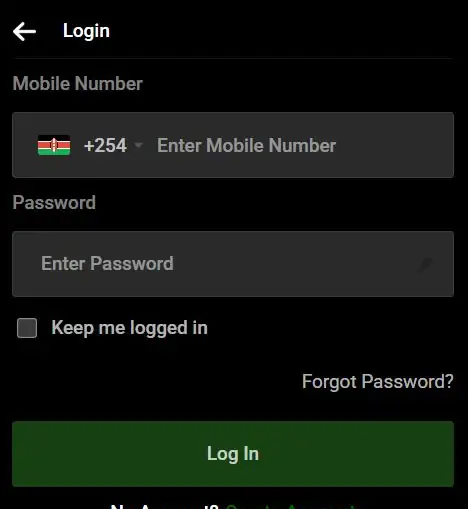
- Open 9Ubet.co.ke in your phone's browser.
- Tap Login.
- Enter your registered number after +254.
- Enter your password.
- Tap Log In.
From there, the Casino tab takes you to the slots lobby. If you enjoy live tables or crash games, Casino Live and Aviator are in the same menu.
Login Through the 9Ubet App
The app login uses the same number and password, so you do not need a separate account. The official source for the Android app is the Google Play Store.
- Install the app through the Download App page on 9Ubet.co.ke.
- Open the app and tap Login.
- Enter your registered number and password.
- Tap Log In.
I would avoid APK files from other sites and messaging apps, because an unknown file can put your login details at risk.
Keep Me Logged In Option
The Keep me logged in checkbox sits below the Password field. It keeps you from entering your details at each visit, which I find handy on a personal phone.
On a shared device, I would leave the box empty and log out after your session. This stops the next user from opening your account.
9Ubet Casino Password Management
You can manage your password yourself with your registered SIM. I like this approach, because a forgotten password does not have to keep you away from your games.
Password Reset Through SMS
You can reset your password with a verification code sent to your registered number. The Forgot Password? link sits just above the Log In button.
- Tap Forgot Password? on the login form.
- Enter your registered mobile number.
- Enter the code from the SMS.
- Choose a new password.
- Log in with your new details.
If the code does not arrive, check your number and network signal. Keep the code to yourself, even if someone says that they represent support.
Password Requirements
Your password needs a mix of letters and numbers. It must also meet the minimum length shown on the screen.
I would follow these simple rules:
- Use a password that is unique to 9Ubet.
- Avoid your name, birth date or phone number.
- Choose something that you can remember easily.
- Do not save it in a shared browser.
If the form rejects your new password, note the exact error message and share it with support.
9Ubet Casino Login Support
Most login errors come from incorrect details and are quick to solve. These are the two main messages, along with what I would do first.
| Message | What it means | First step |
|---|---|---|
| User not found | No account was found for that number | Check your registered number |
| Invalid credentials | Your details were not accepted | Retype them or reset your password |
User Not Found Error
This error means that the system cannot find an account with the number you entered. A mistyped digit or a different line is a common cause.
Check the number and try again. If you use more than one SIM, try the line you registered with. If the error remains, send support your registered number.
Invalid Credentials Error
This error means that your number or password was not accepted. I would retype both slowly, because a small typing mistake is an easy cause to rule out.
If you are unsure about your password, use Forgot Password? to create a new one. If the error appears again after the reset, tell support the exact message on your screen.
Customer Care Contact Options
9Ubet customer care is available 24/7 by phone, WhatsApp and email. I like having a choice of channels, since a login problem can happen at any time.
| Channel | Contact |
|---|---|
| Phone | +254 709 549 599 |
| +254 113 499 999 | |
| support@9Ubet.com |
Have your registered number and a screenshot of the error ready. Once you are back in, set your budget and enjoy your session.
FAQ
These are the short answers I would give a friend who has a login question.
How do I log in to 9Ubet Casino?
Tap Login on 9Ubet.co.ke or in the app. Enter your registered number and password, then tap Log In.
What should I do if I forget my password?
Tap Forgot Password? and enter your registered number. Enter the SMS code and choose a new password.
Why can't I access my 9Ubet Casino account?
Your number or password may be incorrect, so check both first. If the problem remains, contact support with the exact error message.
Can I use the same login for sports and casino?
Yes, one 9Ubet account gives you access to both sections. You use the same number and password.
Where can I check my casino bonuses after login?
Check Bonus Records in your transaction history. The Promotions page shows the current offers.